REI offers all employees paid Sick Time. All employees accrue sick time from their first day of work, and it’s available for use immediately as it’s earned. Your sick plan aligns with the state in which you work. Review the accrual schedule below to determine your Sick Time accrual plan.
Sick Time
What Is Sick Time?
Sick time is paid time off you can use to care for yourself or a family member when there’s a health or safety need. This includes illness or injury, preventive care, mental health needs, certain public health situations and other protected uses where required by law.
Family members generally include your spouse or domestic partner, children, parents, siblings, grandparents, grandchildren and, where allowed, someone with whom you have a close family-like relationship. For full plan details, including state-specific requirements, please review the Sick Pay policy in REIweb > PolicyTech.
| Location | Accrual Rate | Accrual Cap | Annual Usage Cap | Carryover |
|---|---|---|---|---|
| All others not listed below | 1 hour for every 30 hours paid | 40 hours | 80 hours | 80 hours |
| Alaska, Nebraska, New York | 1 hour for every 30 hours paid | 56 hours | 80 hours | Unlimited |
| California (Berkeley, Oakland, Santa Monica, San Francisco) | 1 hour for every 30 hours paid | 80 hours | Unlimited | 80 hours |
| California (Los Angeles, San Diego, all other California locations not listed above) | 1 hour for every 30 hours paid | 80 hours | 80 hours | Unlimited |
| Chicago, Illinois | 1 hour for every 30 hours paid (2 buckets) | Paid Leave: 40 hours per 12-month period Paid Sick Leave: 40 hours per 12-month period | Unlimited | Paid Leave: 16 hours and Paid Sick Leave: 80 hours |
| Colorado | 1 hour for every 30 hours paid | 48 hours | 80 hours | 80 hours |
| Maine | 1 hour for every 30 hours paid | 40 hours | Unlimited | Unlimited |
| Maryland | 1 hour for every 30 hours paid | 56 hours | 80 hours | 80 hours |
| Michigan and New Mexico | 1 hour for every 30 hours paid | Unlimited | 80 hours | 80 hours |
| Minnesota | 1 hour for every 30 hours paid | 48 hours | Unlimited | 80 hours |
| Pennsylvania | 1 hour for every 30 hours paid | 72 hours | 80 hours | Unlimited |
| Washington | 1 hour for every 30 hours paid | Unlimited | Unlimited | 80 hours |
Sick Time
REI offers all employees paid Sick Time. All employees accrue sick time from their first day of work, and it’s available for use immediately as it’s earned. Your sick plan aligns with the state in which you work. Review the accrual schedule below to determine your Sick Time accrual plan.
What Is Sick Time?
Sick time is paid time off you can use to care for yourself or a family member when there’s a health or safety need. This includes illness or injury, preventive care, mental health needs, certain public health situations and other protected uses where required by law.
Family members generally include your spouse or domestic partner, children, parents, siblings, grandparents, grandchildren and, where allowed, someone with whom you have a close family-like relationship. For full plan details, including state-specific requirements, please review the Sick Pay policy in REIweb > PolicyTech.
| Location | Accrual Rate | Accrual Cap | Annual Usage Cap | Carryover |
|---|---|---|---|---|
| All others not listed below | 1 hour for every 30 hours paid | 40 hours | 80 hours | 80 hours |
| Alaska, Nebraska, New York | 1 hour for every 30 hours paid | 56 hours | 80 hours | Unlimited |
| California (Berkeley, Oakland, Santa Monica, San Francisco) | 1 hour for every 30 hours paid | 80 hours | Unlimited | 80 hours |
| California (Los Angeles, San Diego, all other California locations not listed above) | 1 hour for every 30 hours paid | 80 hours | 80 hours | Unlimited |
| Chicago, Illinois | 1 hour for every 30 hours paid (2 buckets) | Paid Leave: 40 hours per 12-month period Paid Sick Leave: 40 hours per 12-month period | Unlimited | Paid Leave: 16 hours and Paid Sick Leave: 80 hours |
| Colorado | 1 hour for every 30 hours paid | 48 hours | 80 hours | 80 hours |
| Maine | 1 hour for every 30 hours paid | 40 hours | Unlimited | Unlimited |
| Maryland | 1 hour for every 30 hours paid | 56 hours | 80 hours | 80 hours |
| Michigan and New Mexico | 1 hour for every 30 hours paid | Unlimited | 80 hours | 80 hours |
| Minnesota | 1 hour for every 30 hours paid | 48 hours | Unlimited | 80 hours |
| Pennsylvania | 1 hour for every 30 hours paid | 72 hours | 80 hours | Unlimited |
| Washington | 1 hour for every 30 hours paid | Unlimited | Unlimited | 80 hours |
Sick Time
REI offers all employees paid Sick Time. All employees accrue sick time from their first day of work, and it’s available for use immediately as it’s earned. Your sick plan aligns with the state in which you work. Review the accrual schedule below to determine your Sick Time accrual plan.
What Is Sick Time?
Sick time is paid time off you can use to care for yourself or a family member when there’s a health or safety need. This includes illness or injury, preventive care, mental health needs, certain public health situations and other protected uses where required by law.
Family members generally include your spouse or domestic partner, children, parents, siblings, grandparents, grandchildren and, where allowed, someone with whom you have a close family-like relationship. For full plan details, including state-specific requirements, please review the Sick Pay policy in REIweb > PolicyTech.
| Location | Accrual Rate | Accrual Cap | Annual Usage Cap | Carryover |
|---|---|---|---|---|
| All others not listed below | 1 hour for every 30 hours paid | 40 hours | 80 hours | 80 hours |
| Alaska, Nebraska, New York | 1 hour for every 30 hours paid | 56 hours | 80 hours | Unlimited |
| California (Berkeley, Oakland, Santa Monica, San Francisco) | 1 hour for every 30 hours paid | 80 hours | Unlimited | 80 hours |
| California (Los Angeles, San Diego, all other California locations not listed above) | 1 hour for every 30 hours paid | 80 hours | 80 hours | Unlimited |
| Chicago, Illinois | 1 hour for every 30 hours paid (2 buckets) | Paid Leave: 40 hours per 12-month period Paid Sick Leave: 40 hours per 12-month period | Unlimited | Paid Leave: 16 hours and Paid Sick Leave: 80 hours |
| Colorado | 1 hour for every 30 hours paid | 48 hours | 80 hours | 80 hours |
| Maine | 1 hour for every 30 hours paid | 40 hours | Unlimited | Unlimited |
| Maryland | 1 hour for every 30 hours paid | 56 hours | 80 hours | 80 hours |
| Michigan and New Mexico | 1 hour for every 30 hours paid | Unlimited | 80 hours | 80 hours |
| Minnesota | 1 hour for every 30 hours paid | 48 hours | Unlimited | 80 hours |
| Pennsylvania | 1 hour for every 30 hours paid | 72 hours | 80 hours | Unlimited |
| Washington | 1 hour for every 30 hours paid | Unlimited | Unlimited | 80 hours |
To understand how your plan works, it’s important to know how Sick Time is earned, how much can be used each year and what happens to unused time. See the definitions below for details on accrual, usage and carryover.
Accrual Cap
- The maximum number of sick hours you can accrue at one time.
- As hours are used, you may continue accruing until you reach the cap again.
- Carryover hours are separate from and additive to the accrual cap.
Annual Usage Cap
- The number of sick hours that you can use during a calendar year
Carryover
- The number of hours you can carry over at the end of a calendar year
View the policies regarding your time-off benefits by visiting REIweb > Employee Policies.
To understand how your plan works, it’s important to know how Sick Time is earned, how much can be used each year and what happens to unused time. See the definitions below for details on accrual, usage and carryover.
Accrual Cap
- The maximum number of sick hours you can accrue at one time.
- As hours are used, you may continue accruing until you reach the cap again.
- Carryover hours are separate from and additive to the accrual cap.
Annual Usage Cap
The number of sick hours that you can use during a calendar year
Carryover
The number of hours you can carry over at the end of a calendar year
Accrual Start Date
All employees will begin accruing time as of their first day worked.
View the policies regarding your time-off benefits by visiting REIweb > Employee Policies.
To understand how your plan works, it’s important to know how Sick Time is earned, how much can be used each year and what happens to unused time. See the definitions below for details on accrual, usage and carryover.
Accrual Cap
- The maximum number of sick hours you can accrue at one time.
- As hours are used, you may continue accruing until you reach the cap again.
- Carryover hours are separate from and additive to the accrual cap.
Annual Usage Cap
The number of sick hours that you can use during a calendar year
Carryover
The number of hours you can carry over at the end of a calendar year
Accrual Start Date
All employees will begin accruing time as of their first day worked.
View the policies regarding your time-off benefits by visiting REIweb > Employee Policies.
Frequently Asked Questions
I’m an HQ, Exempt, Department Manager or Assistant Store Manager and I don’t accrue sick time today. What does this change mean to me?
All employees will accrue sick time per pay period based on the requirements of state and local law and will be required to report the use of sick time on their timesheets. All HQ, exempt and store hourly managers will receive a one-time front-loaded balance of 80 hours of sick time beginning with the June 28, 2026, pay period, which will be visible in Dimensions (timesheet). Any sick time taken starting as of that date will decrement from the new sick plan.
How much sick time can I accrue in a year?
You can earn sick time up to the accrual caps for your location as listed in the “Sick Time Accrual” section above. Once you reach that limit, you’ll stop accruing sick time. If you use some of your sick time and your balance falls below the accrual cap, you will begin accruing sick time again.
As a reminder, the sick accrual rate remains the same as today at 1 hour earned for every 30 hours paid.
What happens to my accrued sick balance if it exceeds the state or local law accrual maximums?
If your sick balance is above your state or local law’s maximum after July 1, 2026, you’ll keep that balance and you can continue using it. You’ll start accruing sick time again once your balance falls below the new accrual caps.
For 2027 and beyond, we’re working to answer the questions we’ve received regarding how this situation will work after the end of 2026. We’ll share more information in June.
How do I submit my time-off request to my direct leader?
You can use Dimensions to submit your time-off requests. Access this from REIweb > UKG Dimensions. From the homepage, select the Time Off Request in your My Accruals tile. Once your request is submitted, ensure that your leader has reviewed and approved the time and that it’s accurately reflected on your timesheet.
Where can I see how much sick time I have accrued and how much sick time I have remaining to use this calendar year?
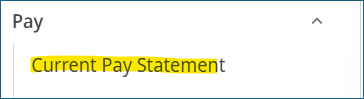
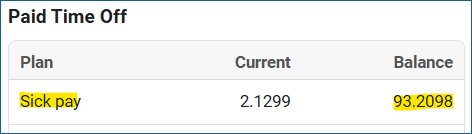
You can view your available sick balance on your pay statement. This amount reflects both your accrued and carryover sick balance. Pay statements can be found in Employee Self Service at hr.rei.com > Pay > Current Pay Statement > Paid Time Off section of your paystub.
Dimensions will show you how many hours you can request based on your annual usage cap. This is visible on the My Accruals tile in Dimensions.

Where can I see my sick usage cap?
Dimensions will show you how many hours you can request based on your annual usage cap. This is visible on the My Accruals tile in Dimensions.
What happens if I hit the usage cap for the year but have hours remaining in my sick accrual balance?
If you hit your usage cap, you can no longer apply sick time for incidental absences (i.e. cold/flu, doctor’s appointments, care for a sick child) or apply time to an unpaid leave of absence. Any remaining accrued time will carry over into the following year, up to the applicable carryover maximum for your work location.
Where should I go for questions about submitting or changing my time-off request?
You can use Dimensions to submit your time-off requests. Access this on REIweb > UKG Dimensions. From your home page, select Time Off Request in your My Accruals tile. Once your request is submitted, ensure that your leader has reviewed and approved the time and it is accurately reflected on your timesheet.
For questions, all employees can access timekeeping training in Spark, which serves as a helpful reference guide, or contact the Employee Service Center at hrhr@rei.com.
If I have used sick hours prior to this change, will my usage be counted against the new usage cap?
No, the usage cap only applies to sick hours used from June 28 forward, for time processed on the July 10 weekly payroll and the July 17 bi-weekly payroll.
What happens if an employee has no sick accruals to apply to a sick absence?
If an employee takes a sick absence and has no available sick time, the time will be unpaid by default. Employees may choose to apply available vacation to receive pay; however, using vacation in place of sick time does not change how the absence is treated under the Attendance Policy.
Why are we sunsetting sick/vacation donation program?
When the donation program was introduced, fewer employees had access to accrued sick time and vacation. As our programs have evolved, eligibility has expanded and more employees now have access to these benefits. As a result, the donation program is no longer necessary. Employees needing longer periods away from work remain supported through our leave of absence programs.
Are the changes to requesting sick and vacation time new as part of the mid-year Total Rewards updates?
No. Requesting and approving sick and vacation time has always been REI’s standard practice. However, application at HQ has not been consistent across teams.
As part of the mid-year Total Rewards updates, we are aligning HQ with the long-standing co-op-wide standard. This includes reinforcing consistent timekeeping practices, where exempt employees’ timesheets default to 40 hours per week (8 hours per day), and a time-off request is required if a full day is not worked.
This alignment helps ensure a consistent approach to timekeeping across all divisions of the co-op.
What are the timekeeping expectations for exempt employees?
For exempt employees, timesheets are automatically set to 40 hours per week (8 hours per day). If you are not working a full day, please submit a time-off request to your leader. This approach is consistent across all divisions of the co-op and helps ensure uniform timekeeping practices.
Frequently Asked Questions
How much sick time can I accrue in a year?
You can earn sick time up to the accrual caps for your location as listed in the Sick Time Accrual section above. Once you reach that limit, you’ll stop accruing sick time. If you use some of your sick time and your balance falls below the accrual cap, you’ll begin accruing sick time again.
As a reminder, the sick accrual rate remains the same as today at 1 hour earned for every 30 hours paid.
What happens to my accrued sick balance if it exceeds the state or local law accrual maximums?
If your sick balance is above your state or local law’s maximum after July 1, 2026, you’ll keep that balance and can continue using it. You’ll start accruing sick time again once your balance falls below the new accrual caps. At year end, your sick time balance will be adjusted to the carryover cap.
Note: REI will comply with all local or state laws that govern vacation or sick leave to the extent that state or local laws provide more generous benefits to you.
View the policies regarding your time-off benefits by visiting REIweb > Employee Policies.
How do I submit my time-off request to my direct leader?
You can use Dimensions to submit your time-off requests. Access this from REIweb > UKG Dimensions. From the homepage, select the Time Off Request in your My Accruals tile. Once your request is submitted, ensure that your leader has reviewed and approved the time and that it’s accurately reflected on your timesheet.
Where can I see how much sick time I have accrued and how much sick time I have remaining to use this calendar year?
You can view your available sick balance on your pay statement. This amount reflects both your accrued and carryover sick balance. Pay statements can be found in Employee Self Service at hr.rei.com > Pay > Current Pay Statement > Paid Time Off section of your paystub.
Dimensions will show you how many hours you can request based on your annual usage cap. This is visible on the My Accruals tile in Dimensions.
Where can I see my sick usage cap?
Dimensions will show you how many hours you can request based on your annual usage cap. This is visible on the My Accruals tile in Dimensions.
What happens if I hit the usage cap for the year but have hours remaining in my sick accrual balance?
If you hit your usage cap, you can no longer apply sick time for incidental absences (i.e. cold/flu, doctor’s appointments, care for a sick child) or apply time to an unpaid leave of absence. Any remaining accrued time will carry over into the following year, up to the applicable carryover maximum for your work location.
Where should I go for questions about submitting or changing my time-off request?
You can use Dimensions to submit your time-off requests. Access this on REIweb > UKG Dimensions. From your home page, select Time Off Request in your My Accruals tile. Once your request is submitted, ensure that your leader has reviewed and approved the time and it is accurately reflected on your timesheet.
For questions, all employees can access timekeeping training in Spark, which serves as a helpful reference guide, or contact the Employee Service Center at hrhr@rei.com.
If I have used sick hours prior to this change, will my usage be counted against the new usage cap?
No, the usage cap only applies to sick hours used from June 28 forward, for time processed on the July 10 weekly payroll and the July 17 bi-weekly payroll.
What happens if an employee has no sick accruals to apply to a sick absence?
If an employee takes a sick absence and has no available sick time, the time will be unpaid by default. Employees may choose to apply available vacation to receive pay; however, using vacation in place of sick time does not change how the absence is treated under the Attendance Policy.
Why are we sunsetting sick/vacation donation program?
When the donation program was introduced, fewer employees had access to accrued sick time and vacation. As our programs have evolved, eligibility has expanded and more employees now have access to these benefits. As a result, the donation program is no longer necessary. Employees needing longer periods away from work remain supported through our leave of absence programs.
Are the changes to requesting sick and vacation time new as part of the mid-year Total Rewards updates?
No. Requesting and approving sick and vacation time has always been REI’s standard practice. However, application at HQ has not been consistent across teams.
As part of the mid-year Total Rewards updates, we are aligning HQ with the long-standing co-op-wide standard. This includes reinforcing consistent timekeeping practices, where exempt employees’ timesheets default to 40 hours per week (8 hours per day), and a time-off request is required if a full day is not worked.
This alignment helps ensure a consistent approach to timekeeping across all divisions of the co-op.
What are the timekeeping expectations for exempt employees?
For exempt employees, timesheets are automatically set to 40 hours per week (8 hours per day). If you are not working a full day, please submit a time-off request to your leader. This approach is consistent across all divisions of the co-op and helps ensure uniform timekeeping practices.
Frequently Asked Questions
How much Sick Time can I accrue in a year?
You can earn Sick Time up to the accrual caps for your location as listed in the Sick Time Accrual section above. Once you reach that limit, you’ll stop accruing sick time. If you use some of your sick time and your balance falls below the accrual cap, you’ll begin accruing sick time again.
As a reminder, the sick accrual rate remains the same as today at 1 hour earned for every 30 hours paid.
What happens to my accrued sick balance if it exceeds the state or local law accrual maximums?
If your sick balance is above your state or local law’s maximum after July 1, 2026, you’ll keep that balance and can continue using it. You’ll start accruing sick time again once your balance falls below the new accrual caps. At year end, your Sick Time balance will be adjusted to the carryover cap.
Note: REI will comply with all local or state laws that govern vacation or sick leave to the extent that state or local laws provide more generous benefits to you.
View the policies regarding your time-off benefits by visiting REIweb > Employee Policies.
How do I submit my time-off request to my direct leader?
You can use Dimensions to submit your time-off requests. Access this from REIweb > UKG Dimensions. From the homepage, select the Time Off Request in your My Accruals tile. Once your request is submitted, ensure that your leader has reviewed and approved the time and that it’s accurately reflected on your timesheet.
Where can I see how much sick time I have accrued and how much sick time I have remaining to use this calendar year?
You can view your available sick balance on your pay statement. This amount reflects both your accrued and carryover sick balance. Pay statements can be found in Employee Self Service at hr.rei.com > Pay > Current Pay Statement > Paid Time Off section of your paystub.
Dimensions will show you how many hours you can request based on your annual usage cap. This is visible on the My Accruals tile in Dimensions.
Where can I see my sick usage cap?
Dimensions will show you how many hours you can request based on your annual usage cap. This is visible on the My Accruals tile in Dimensions.
What happens if I hit the usage cap for the year but have hours remaining in my sick accrual balance?
If you hit your usage cap, you can no longer apply sick time for incidental absences (i.e. cold/flu, doctor’s appointments, care for a sick child) or apply time to an unpaid leave of absence. Any remaining accrued time will carry over into the following year, up to the applicable carryover maximum for your work location.
Where should I go for questions about submitting or changing my time-off request?
You can use Dimensions to submit your time-off requests. Access this on REIweb > UKG Dimensions. From your home page, select Time Off Request in your My Accruals tile. Once your request is submitted, ensure that your leader has reviewed and approved the time and it is accurately reflected on your timesheet.
For questions, all employees can access timekeeping training in Spark, which serves as a helpful reference guide, or contact the Employee Service Center at hrhr@rei.com.
If I have used sick hours prior to this change, will my usage be counted against the new usage cap?
No, the usage cap only applies to sick hours used from June 28 forward, for time processed on the July 10 weekly payroll and the July 17 bi-weekly payroll.
What happens if an employee has no sick accruals to apply to a sick absence?
If an employee takes a sick absence and has no available sick time, the time will be unpaid by default. Employees may choose to apply available vacation to receive pay; however, using vacation in place of sick time does not change how the absence is treated under the Attendance Policy.
Why are we sunsetting sick/vacation donation program?
When the donation program was introduced, fewer employees had access to accrued sick time and vacation. As our programs have evolved, eligibility has expanded and more employees now have access to these benefits. As a result, the donation program is no longer necessary. Employees needing longer periods away from work remain supported through our leave of absence programs.
Are the changes to requesting sick and vacation time new as part of the mid-year Total Rewards updates?
No. Requesting and approving sick and vacation time has always been REI’s standard practice. However, application at HQ has not been consistent across teams.
As part of the mid-year Total Rewards updates, we are aligning HQ with the long-standing co-op-wide standard. This includes reinforcing consistent timekeeping practices, where exempt employees’ timesheets default to 40 hours per week (8 hours per day), and a time-off request is required if a full day is not worked.
This alignment helps ensure a consistent approach to timekeeping across all divisions of the co-op.
What are the timekeeping expectations for exempt employees?
For exempt employees, timesheets are automatically set to 40 hours per week (8 hours per day). If you are not working a full day, please submit a time-off request to your leader. This approach is consistent across all divisions of the co-op and helps ensure uniform timekeeping practices.
Done exploring?
Go Back to Guided Tour