Retirement

Recreational Equipment, Inc. Retirement Savings Plan

REI helps you save for retirement with a 401(k) Plan administered through Voya. You’ll be automatically enrolled in the Plan after 90 days from your date of hire or rehire if you do not make an active election. Both you and REI contribute to your account.

Updates for 2026

New in July: Employer Matching Contribution

Beginning July 3, 2026, REI will transition from a guaranteed employer contribution structure to a matching contribution structure. The employer match is calculated based on the annual average of your total contributions and eligible compensation for the full plan year (see the “Exception for 2026” section below).

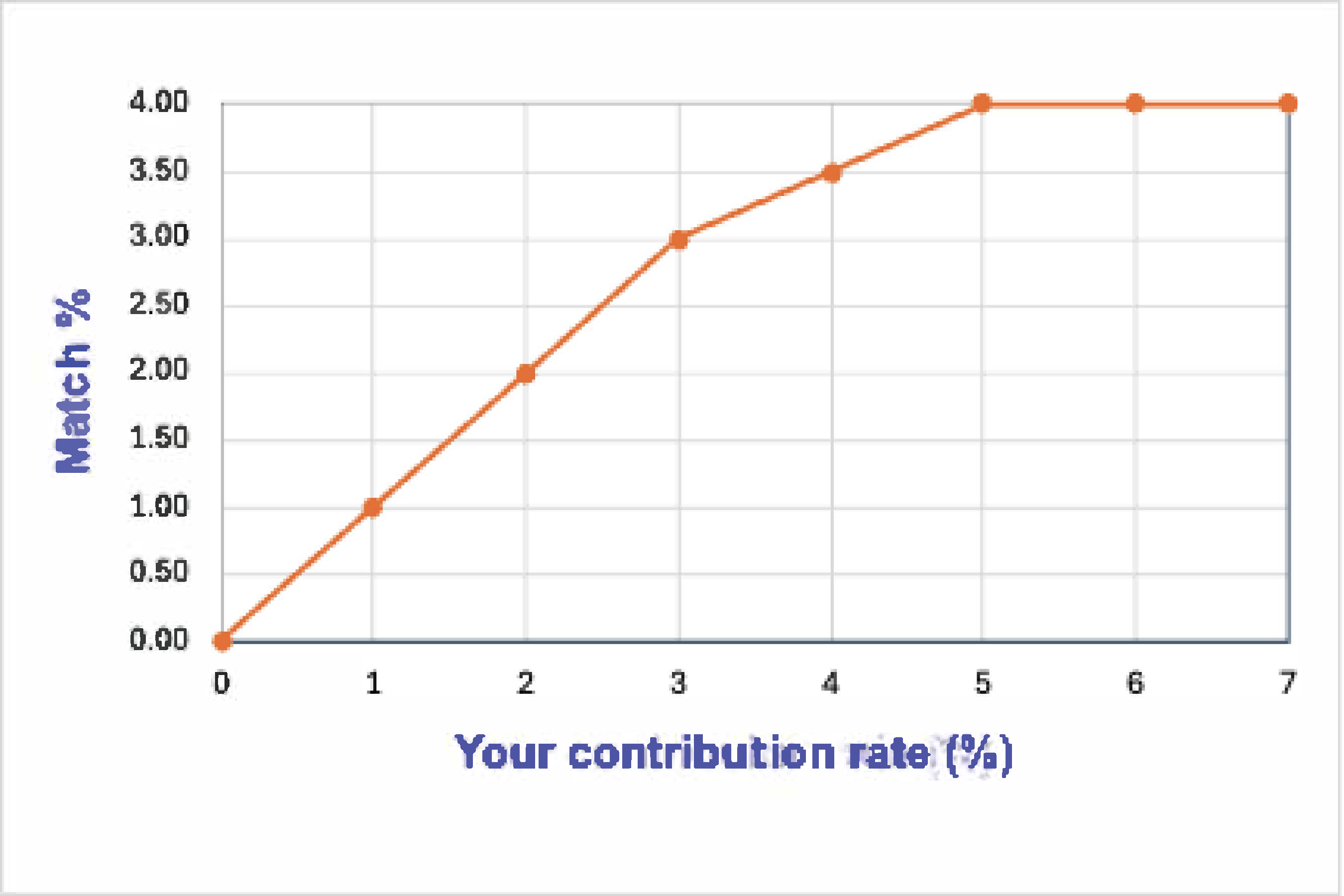
REI will match your contributions as follows:

  • 100% of the first 3% you contribute
  • 50% of the next 2% you contribute
  • Maximum match = 4% when you contribute at least 5%

The match is subject to the three-year vesting schedule: 33%, 66%, 100%. You’re 100% vested when you reach your third work anniversary with REI.

Your contribution elections remain unchanged. If you would like to update your elections for your July 3 paycheck, log in to REI.voya.com to update your contribution elections by June 26, 2026, 1pm PT/4pm ET.

You can make changes to increase, decrease or stop your contribution election at any time.

Join a Voya Webcast

Register here to learn more about the matching contribution, find out what to expect during the transition year or schedule a one-on-one session with a retirement advisor:

DateTime
June 17, 202610am PT/1 pm ET
2 pm PT/5 pm ET
June 18, 20268 am PT/11 am ET
12 pm PT/3 pm ET

Eligibility

You’re eligible to begin saving in the Plan 30 days following your date of hire. Once eligible, you’ll receive enrollment information from Voya.

You must meet all the following requirements to be eligible for the match in each plan year:

  • One year of service with REI (first anniversary falls during or prior to the plan year)
  • Each year, you complete at least 1,000 hours (counted for pay periods that end within the calendar year).
  • Each year, you’re employed on December 31.

How the Employer Match Is Calculated

To receive the match, you must contribute to your retirement account. Matching contributions:

  • Are based on your annual average contribution for the year, calculated as: total employee contribution/your total eligible earnings for the plan year (see the “Exception for 2026” section below)
  • Are not applied on contributions from Summit Incentive pay
  • Are calculated after the end of the plan year
  • Are not calculated paycheck by paycheck
  • Are deposited to your account in March of the following year

Eligible earnings include compensation paid within the calendar year and are subject to the annual IRS limits. They don’t include Summit Incentive pay.

Examples:

Annual Pay*Deferral %A
Your Annual Contribution**
B
REI Annual Match
A+B
Total Annual Retirement Savings
$66,0003%$1,980$1,980$3,960
4%$2,640$2,310$4,950
5%$3,300$2,640$5,940
$25,0003%$750$750$1,500
4%$1,000$875$1,875
5%$1,250$1,000$2,250

*Summit pay NOT included.
**Contributions from Summit pay NOT included.

Exception for 2026

There are two employer contributions for 2026, the transition year:

2026 Retirement Contribution Timeline
January 2–June 26
Guaranteed contribution
July 3–December 31
Match contribution
  • The guaranteed employer contribution will be calculated using eligible pay from the January 2 to June 26 pay dates.
  • Matching contributions will be calculated using the average employee contributions and eligible pay from July 3 to December 31 pay dates. If you reach IRS contribution limits before July 3, you may not receive a match in 2026.
  • Eligibility requirements must be met for the full year to get both contributions:
    • One year of service with REI (first work anniversary falls within or prior to 2026),
    • Work at least 1,000 hours (counted from January 9 to December 31 paychecks), and
    • Employed on December 31, 2026
  • Both contributions will be deposited into the retirement plan in March 2027.

Examples:

Annual Pay*Deferral %A
Your Annual Contribution**
B
5% Guaranteed Jan–June
C
Match July–Dec
B + C
Total REI Contribution
A + B + C
Total Annual Retirement Savings
$66,0003%$1,980$1,650$990$2,640$4,620
4%$2,640$1,650$1,155$2,805$5,445
5%$3,300$1,650$1,320$2,970$6,270
$25,0003%$750$625$375$1,000$1,750
4%$1,000$625$438$1,063$2,063
5%$1,250$625$500$1,125$2,375

*Summit pay NOT included. Assume annual pay is divided equally between first and second half of 2026.
**Contributions from Summit pay NOT included. Assume annual contribution is divided equally between first and second half of 2026.

More Resources

Summit Incentive Deferral Window

How you can defer Summit Incentive Pay depends on your role. Please review the section that applies to you. Eligible employees may defer up to 75% of their Summit payout subject to IRS limits.

Quarterly Summit Incentive Pay

If you work in a store or DC sector, Summit Incentive Pay is paid quarterly. You may choose to defer a portion of each quarterly payment to your REI retirement plan.

How it works:

  • You may make or change your deferral election each quarter.
  • For Q1 2026 Summit ONLY, deferral elections prior to May 16, 2026, will not roll over.
  • Your election remains in place for future quarters unless you update it before a deadline.
  • Deferrals from Summit pay are separate from your regular paycheck elections.

Quarterly Deferral Windows and Pay Dates

Summt PayoutPaycheck DateElection Change Deadline
2026 Q1 SummitJune 5, 2026May 29, 2026 (1pm PT / 4pm ET)
2026 Q2 SummitAugust 14, 2026August 7, 2026 (1pm PT / 4pm ET)
2026 Q3 SummitNovember 20, 2026November 13, 2026 (1pm PT / 4pm ET)
2026 Q4 SummitFebruary 26, 2027February 19, 2027 (1pm PT / 4pm ET)

*All deferral changes must be submitted before the quarterly Election Change Deadline to apply to that Summit payment.

Annual Summit Incentive Pay

Summit Incentive Pay is paid once per year if you work in an HQ or SCS sector. You may choose to defer a portion of your annual Summit payment during the election window, which will be announced annually. Elections made for each annual election window will not roll over to the next year.

  • Log in to REI.voya.com.
  • Go to Contributions & Savings > Manage Contribution.
  • Under Bonus Pay, select from the following options:
    • Pre-tax: Incentive Employee 401(k)
    • Post-tax: Incentive Roth 401(k)
  • Enter your contribution election as a whole percentage.
  • Click Save Changes.

2026 Contribution Limits and New Roth Catch-up Rule

Age on December 31, 2026Contribution Limit
Under 50$24,500
50–59 and 64 and older$32,500
($24,500 + $8,000 in catch-up contributions)
60–63*$35,700
($24,500 + $11,250 in catch-up contributions)

*Beginning with the July 3, 2026, pay date

New Roth Catch‑Up Contribution Rule (Effective January 1, 2026)

Beginning January 1, 2026, the SECURE 2.0 Act introduces a key change for certain employees:

  • If you are age 50 or older, and you earned more than $150,000 in FICA wages in the prior year, all catch‑up contributions must be made as Roth (post‑tax) contributions.

Click here to learn more about what this means for you and what you should consider.

Log in to your account at REI.voya.com to review or make changes to your contributions.

Enrolling in the Plan

Enroll or Access Your Account

Follow these steps to enroll in or access your account.

Want to learn more about the Plan features before you enroll? Visit go.Voya.com/REI.

Step 1: Register and enroll

Enroll at REI.voya.com or via the Voya Retire® mobile app. You’ll need a code/PIN to register your account. Obtain your code/PIN by visiting REI.voya.com and clicking Register Now. Enter the necessary information on the welcome screen and then click Continue.

You can receive a code/PIN through one of the following options:

  1. Email: Active employees with a work email can request a code, which will expire in 24 hours.
  2. Cell phone number: Active employees may receive their PIN through their mobile phone number in UKG if available.
  3. U.S. mail: Request a PIN to be mailed to your address on file, which may take over seven business days.

After acquiring your code/PIN by email or mail, visit REI.voya.com and click Register Now. On the welcome page, select “I have a PIN,” then establish a unique username and password. This will grant you access to the website and Voya Retire® mobile app. Proceed by clicking Continue.

Step 2: Choose your contribution rate

You may contribute up to 75% of your eligible compensation (up to the IRS contribution limit) in pre-tax and/or Roth 401(k) contributions. You may change your contribution rate at any time.

Step 3: Select your investments

The default investment fund is a target date fund based on your age. However, the Plan offers you multiple investment strategies, including a managed account service through Voya Retirement Advisors powered by Morningstar®. Choose the approach that works for you. You can change your investments at any time.

Step 4: Name your beneficiary

Designating your beneficiary allows your vested account balance to be distributed according to your wishes in the event of your death. It’s important to occasionally review your choice, particularly after major life events such as marriage, the birth of a child or a divorce. Designate your beneficiary by going to Personal Information > Beneficiary Information.

Step 5: Review your profile

Verify that your profile information is correct, including your personal identifiers and mailing address. (Incorrect information may affect your ability to request certain transactions.) While you’re logged in to REI.voya.com, go to your name in the upper right corner and select Personal Information.

Step 6: Opt in for electronic communication

You must opt in to receive electronic communications even if you had done so at Schwab. Stay up to date on important Plan information and announcements. Sign up to receive Plan communication electronically by clicking on your name in the upper right corner and selecting Communication Preferences.

Retirement Planning and Financial Wellness

Whether it’s figuring out how much to contribute to your retirement account, creating a monthly budget, managing your estate planning or paying off your credit card, Voya Learn offers a suite of resources. Once you log in to the plan website, go to Financial Wellness to access Live & On Demand education sessions, Savings Tools & Calculators and Your Financial Wellness journey.

Education Sessions

Voya offers a variety of live sessions and on-demand videos (available in both English and Spanish) to help you on your journey to financial wellness. These sessions cover a wide range of topics to enhance your financial knowledge, including:

Retirement and Investment Advice

Get real-time advice to help you with savings and investment planning. Point-in-time advice—provided by Voya Retirement Advisors powered by Morningstar®—is free to REI employees. For a monthly fee, you may also sign up for managed account services (also through Voya Retirement Advisors powered by Morningstar®). To schedule a consultation, log in to REI.voya.com and select Get Investment Advice.

Additional Voya Resources

Explore these resources to help you on your journey to a more secure financial future.

Managing Your Investments

While some people prefer actively selecting and managing their own investments, others don’t have the time or inclination to actively manage their accounts. REI offers solutions for both these approaches.

Target Date Retirement Funds


What’s Offered

These funds are designed and professionally managed based on your expected retirement date. The investment allocation becomes more conservative as you near your retirement age (age 65). This is also the Plan’s default fund if you don’t choose your own investments.

What It Means for You

If you don’t have the time or desire to manage your retirement plan savings options, these funds may be right for you.

Plan-Selected Funds


What’s Offered

A pre-screened group of diverse investment funds to choose from if you like making your own investment decisions.

What It Means for You

You can create and manage your own investment portfolio using the available funds in the Plan.

Retirement Advice


What’s Offered

Personalized investment recommendations through Voya Retirement Advisors powered by Morningstar®, available at no additional cost, can help you select investments from the Plan’s fund lineup and determine how much to invest in each. If you’re age 50 or older, you can receive a spending strategy that outlines how to optimize your income sources in retirement.

What It Means for You

You can be involved in managing your retirement plan, but you want the benefit of expert retirement advice. To get started, log in to REI.voya.com and select Get Investment Advice.

Managed Account


What’s Offered

Under the fee-based managed account service through Voya Retirement Advisors powered by Morningstar®, you can choose to receive ongoing professional management of your retirement account and automatic adjustments to your investments as your retirement needs change and as you get closer to retirement.

What It Means for You

For a fee, you leave the management of your retirement account to investment professionals. To schedule a consultation, log in to REI.voya.com and select Get Investment Advice.

Brokerage Account


What’s Offered

A self-directed brokerage account designed for knowledgeable investors who have a good understanding of the stock market and the risk associated with the investments available through Schwab’s Personal Choice Retirement Account (PCRA).

What It Means for You

You can choose from a broader range of investment choices outside the pre-selected fund lineup. To open a PCRA account, log in to REI.voya.com and go to Investments & Research > Self-Directed Brokerage Account.

Frequently Asked Questions

You may contact Voya’s customer service associates directly toll-free at 1-833-734-0304 (1-833-REI-0304).

What information is needed to register for online account access?

To register, go to REI.voya.com and click the Register Now button. You will be asked to verify your identity by providing personal information.

If this is your first time registering for access with a Voya-affiliated website, the site will walk you through the online registration process. You will be asked to create a username and password and provide either an email address or cell phone number to verify your account. Refer to Logging in to your account for additional details.

What if I’ve already set up an account with Voya on a different Voya website?

If you’ve previously registered for access through another Voya-affiliated website, log in with those Voya credentials and we’ll send you a verification code using the mobile phone number or email address you provided previously. Once your identity is successfully verified, you can use the same username and password for any Voya-affiliated website going forward.

How will I verify my identity?

The identity verification methods presented are based on elections made by your employer and information you and/or your employer provided to Voya. If your mobile phone number or email address is on file with Voya, a verification code will be sent to your preferred recovery method. You can use the verification code to verify your identity. 

Can my username and recovery email be the same?

No. For security purposes, your username and recovery email address cannot be the same. The preferred recovery method is to use a mobile phone number for verification. Alternatively, you can use a different email address for verification.

What happens if I check “Remember me” on the login page?

Your username will be stored and displayed in the username field each time you visit the site. You will only need your password to log in.

Why should I register my computer/device and browser?

Registering your computer/device and browser saves you time in subsequent website visits. When your computer/device and browser are recognized, you will not be prompted for additional verification every time you log in.

Note: If you register your computer/device but use multiple browsers to access your account, each browser will need to be registered as well. If you clear your browser data, you may be prompted to register your computer/device again.

Are any of the fields case sensitive?

Yes, the password field is case sensitive. The username field is not case sensitive.

I’m having trouble logging in. How do I reset my password or look up my username?

If you forgot your username, select the Forgot Username? link. If you forgot your password, select the Forgot Password? link. You will be prompted for personal information to verify your identity. If your mobile phone number or email address is on file with Voya, a verification code will be sent to your preferred recovery method. You can use the verification code to either recover your username or reset your password.

If you’re still having trouble, call Voya toll-free at 1-833-734-0304 (1-833-REI-0304).

I didn’t receive the verification code. What should I do?

Make sure you check the email/phone number the code was sent to. Partial information to identify the email address or phone number is displayed on the screen.

If the code was sent by email, check your junk or spam folder. Do not close the page asking for your code to retrieve your email. If you need to use the internet to retrieve your email, open a new browser session or tab to log in to your email.

If the code was texted to your mobile phone, wait a minute or two. If you’ve previously opted out of receiving text messages from Voya, text “START” to 582-86 to begin receiving texts. If you still do not see the verification code, you can select Send me a new code.

If you’re still having trouble, call Voya toll-free at 1-833-734-0304 (1-833-REI-0304).

The verification code Voya sent me isn’t working. What’s wrong?

Be sure you’ve entered the correct six-digit verification code on the screen. If it’s correct and still not working, please request another verification code.

Voya sent a verification code to a phone number or email address I no longer use or have access to. What should I do?

Call Voya toll-free at 1-833-734-0304 (1-833-REI-0304). A customer service associate will verify your identity and assist you in updating your contact information.

How long does it take for me to receive a verification code via email or text?

The code should arrive within a few seconds. Sometimes it can take a minute or two, particularly if it’s being sent as an email rather than a text message.

When does the verification code expire?

The verification code expires after 15 minutes. You will need to request a new code if it expires.

Do I need to enter a verification code each time I log in?

You will not be asked to enter a verification code if you register your computer/device and browser.

You may start contributing 30 days after your date of hire.

You will be automatically enrolled after 90 days from your date of hire or rehire if you do not make an active election. REI will automatically deduct 3% of your eligible compensation every pay period and will increase the amount by 1% each year (up to 15%). You may opt out or change your contribution rate at any time through Voya.

You will receive an enrollment packet from Voya. Then, you may enroll through REI.voya.com or by contacting Voya directly at 1-833-734-0304.

You will be automatically enrolled after 90 days from your date of hire or rehire if you do not make an active election. REI will automatically deduct 3% of your eligible compensation every pay period and will increase the amount by 1% each year (up to 15%). You may opt out or change your contribution rate at any time.

You can contribute up to 75% of your eligible compensation, subject to certain contribution dollar limits by the Internal Revenue Service (IRS). You can increase, decrease or stop payroll contributions effective as of any future pay period.

You can contribute post-tax pay to a Roth 401(k) account in the Plan. Distributions of Roth 401(k) contributions are tax-free. Distributions of earnings are also tax-free, provided that the distribution is qualified—your Roth 401(k) account is held for at least five years and withdrawn after reaching age 59½, or because of disability or death.

You can also convert pre-tax balances that you have contributed to your Plan account to Roth through an in-Plan Roth conversion. IRS rules allow you to make in-Plan Roth conversions of your vested account balance regardless of withdrawal or distribution rights. However, they do not allow you to convert required minimum distributions.

REI provides a matching contribution based on the amount you contribute from your pay. The co‑op matches 100% of the first 3% of eligible pay you contribute and 50% of the next 2%, for a maximum total match of up to 4% of eligible pay.

The employer match is calculated based on your average total contributions and eligible compensation for the full plan year and is deposited to your retirement account in the first quarter following the close of the plan year.

To receive the employer match for a plan year, you must:

  • Complete one year of service (reach your first anniversary during or prior to the plan year)
  • Work at least 1,000 hours during the plan year
  • Be actively employed on December 31 of the plan year

Hours of service are counted based on pay periods that end within the plan year, and the employer match is based on eligible compensation paid within the plan year.

REI employer contributions are subject to the plan’s vesting schedule.

The REI contribution is deposited to your retirement account after the close of the plan year. You will not see the contribution on your paycheck. If you receive the employer contribution, you may view the deposit by logging in to your account at REI.voya.com.

Vesting refers to a portion of your account that you own when you leave REI. Depending on how long you worked for REI, you may be partially or fully vested in your Plan accounts. Years of service are counted from your original date of hire.

You are always 100% vested in your contributions from your eligible compensation.

For the REI contributions, you gradually become vested based on a three-year schedule.

 
YEARS OF SERVICE FOR VESTING PERCENT VESTED IN REI CONTRIBUTIONS
Less than 1 0%
1 33%
2 66%
3 100%

For the REI-guaranteed contributions contributed to your account before 2022, you gradually become vested based on a five-year schedule.

 
YEARS OF SERVICE FOR VESTING PERCENT VESTED IN REI CONTRIBUTIONS
Less than 1 0%
1 20%
2 40%
3 60%
4 80%
5 or more 100%

Employees who meet any of the following become immediately 100% vested: reach age 60, become fully disabled or die while employed at REI.

Yes. The Plan offers a point-in-time advice service to help you with savings and investment planning. The service is provided by Voya Retirement Advisors powered by Morningstar®. This service is free to REI employees, but you may also sign up for managed account service for a fee.

Call 1-833-734-0304 and ask to speak to an Investment Advisor Representative.

Want More Information?

Read more about REI’s retirement program in the Frequently Asked Questions.

Check out the Summary Plan Description for an overview of the Plan features and choices, or contact the REI Employee Service Center at hrhr@rei.com or 1-800-999-4734.

REI Retirement and Profit-Sharing Plan

REI Retirement Plan

1-833-734-0304 (1-833-REI-0304)

If hearing impaired: 1-800-579-5708

Done exploring?

Go Back to Guided Tour